
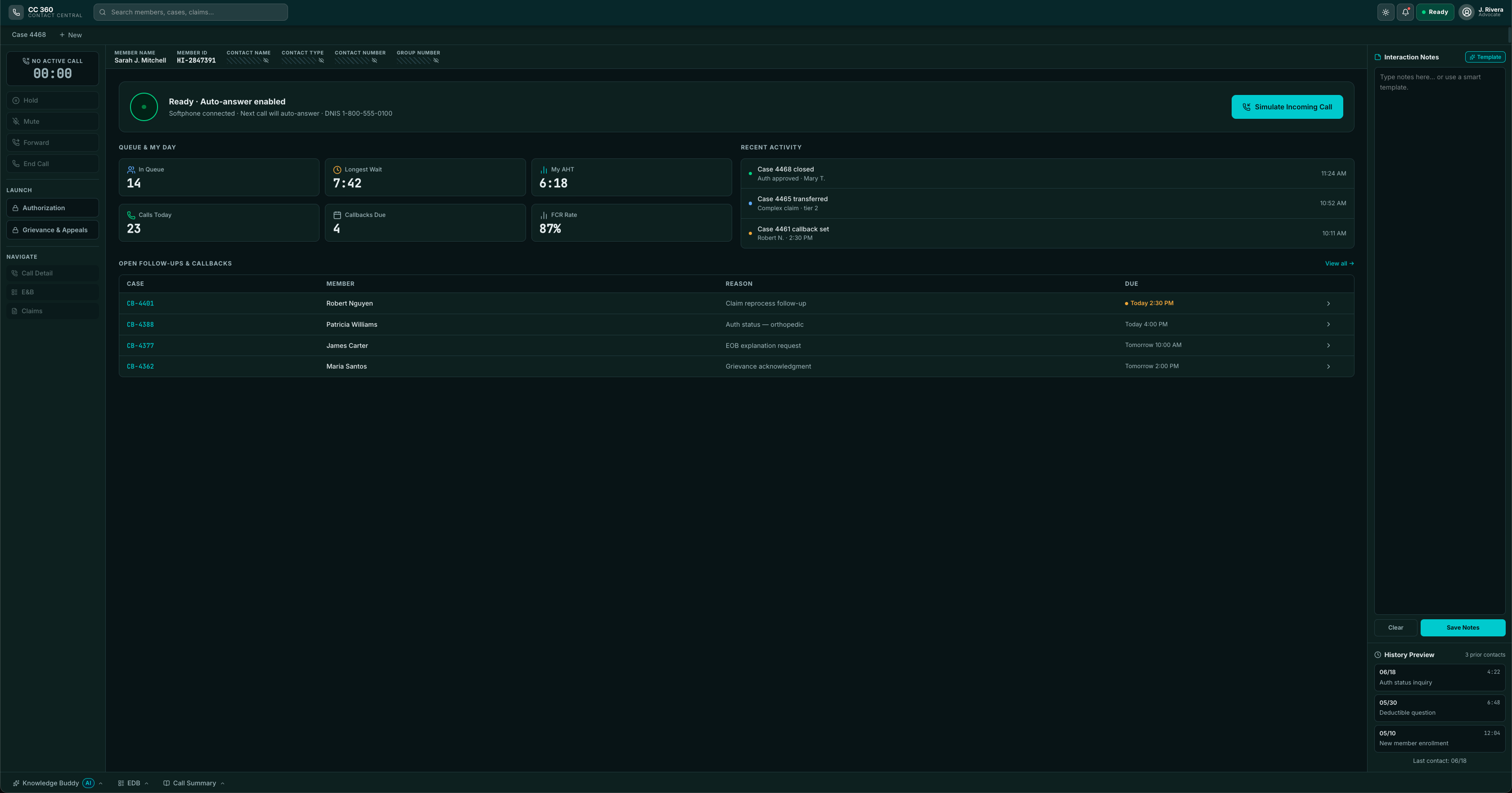
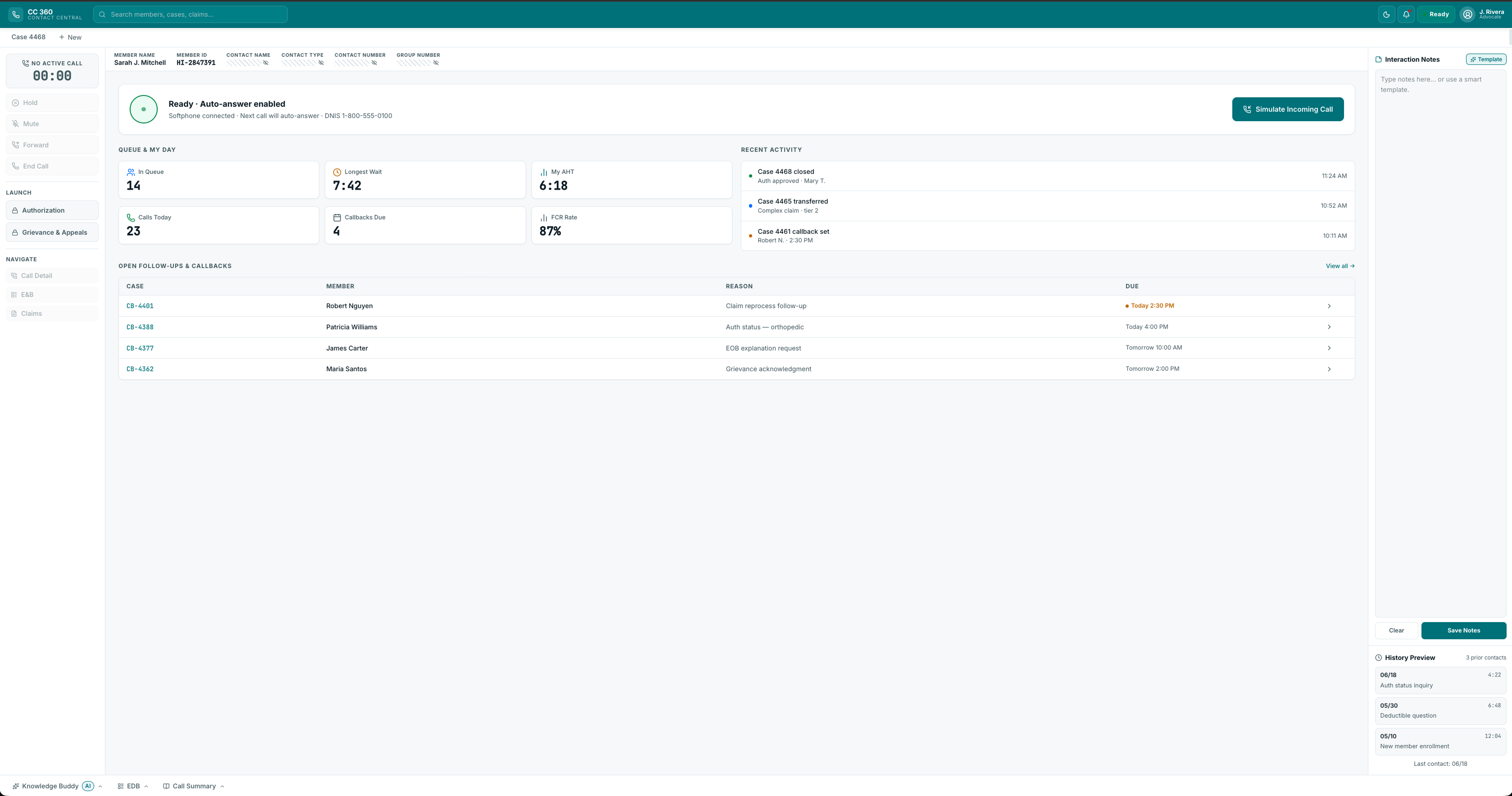
contact central. 360 desktop - advocate experience.
in 90 seconds
context
contact central 360 is the screen a health insurer's advocates work in while they're on the phone with a member, sorting out cover, claims, approvals and complaints under strict compliance rules.
problem
advocates juggled six disconnected systems, logging in and re-checking identity on every call. they were measured on speed, yet a wrong answer about cover could harm a member and breach the rules. the policy they needed lived in their heads, not on the screen.
my mandate
lead ux architect, six months in 2025. i ran discovery and definition: the cross-team workshop, the data and journey analysis, the call-flow mapping, the personas and use cases, and the ui patterns the client's teams would reuse, all inside their design system and platform limits.
three key decisions
- one call, one context. the open case carries the member through every task, so the advocate reads one record instead of assembling it from six, and nobody is asked twice for what the phone system already knew.
see the service blueprint → - check who is calling, first. it might be the member, a relative, a carer or a doctor's office, so the screen keeps member data hidden until identity is confirmed.
see the verification gate → - put the rules in the screen, not in people's heads. guidance appears where the decision is made, and a complaint can't be filed until its checklist and deadline are satisfied.
see the five use cases →
outcome
one advocate desktop, specified through five use cases, with the key interactions documented for design, engineering and accessibility. it holds the member context in one place, builds the safeguards into the screen and extends the client's design system rather than replacing it.
delivered to engineering handoff; no post-launch numbers are claimed.
reflection
where the rules are heavy, the best design move is to carry them for people. the real measure was never how many screens there were; it was whether an advocate could stay with a worried member while the desktop handled the rest.
research& findings
research & findings
discovery workshop
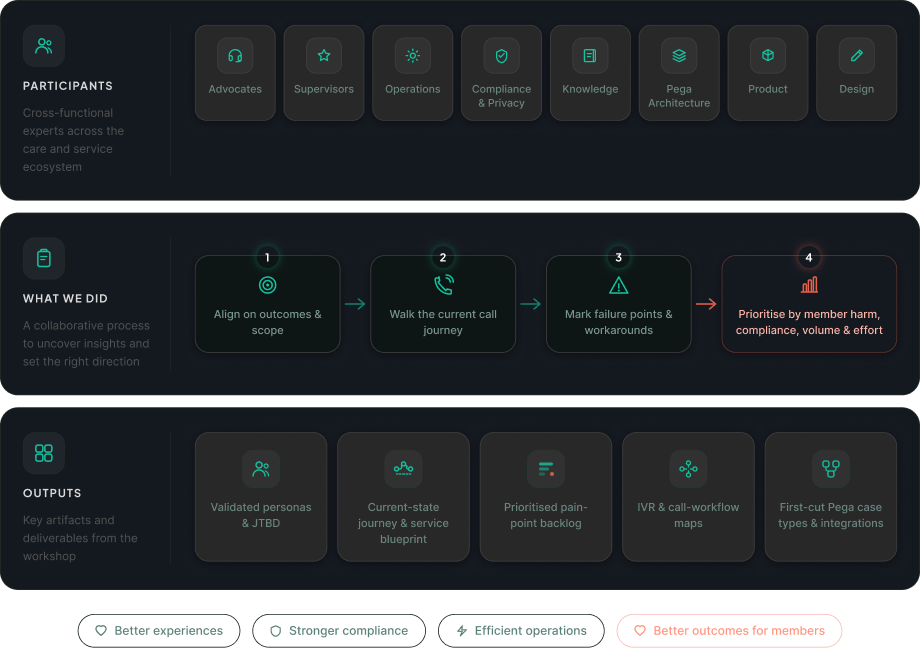
discovery began with the people who live the problem. i facilitated a cross-functional workshop with advocates, supervisors, operations, compliance, knowledge, and pega architecture, using the members' real call drivers as the agenda rather than a feature wishlist. together we walked the current call end to end, marked every failure point and workaround, and prioritised them by member harm, compliance risk, volume, and effort. the outputs became the backbone of the whole engagement.
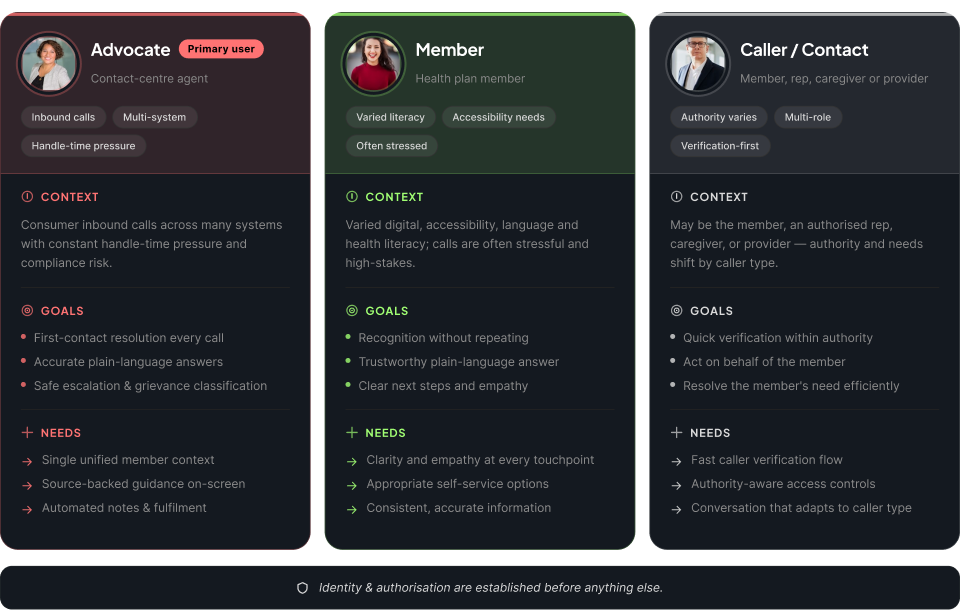
the people we designed for
three primary personas shaped every decision: the advocate who resolves the call, the member the call is about, and the caller on the line, who may be the member, an authorised representative, a caregiver, or a provider. because authority and relationship vary, identity and authorisation come first, and the conversation adapts to who is calling.
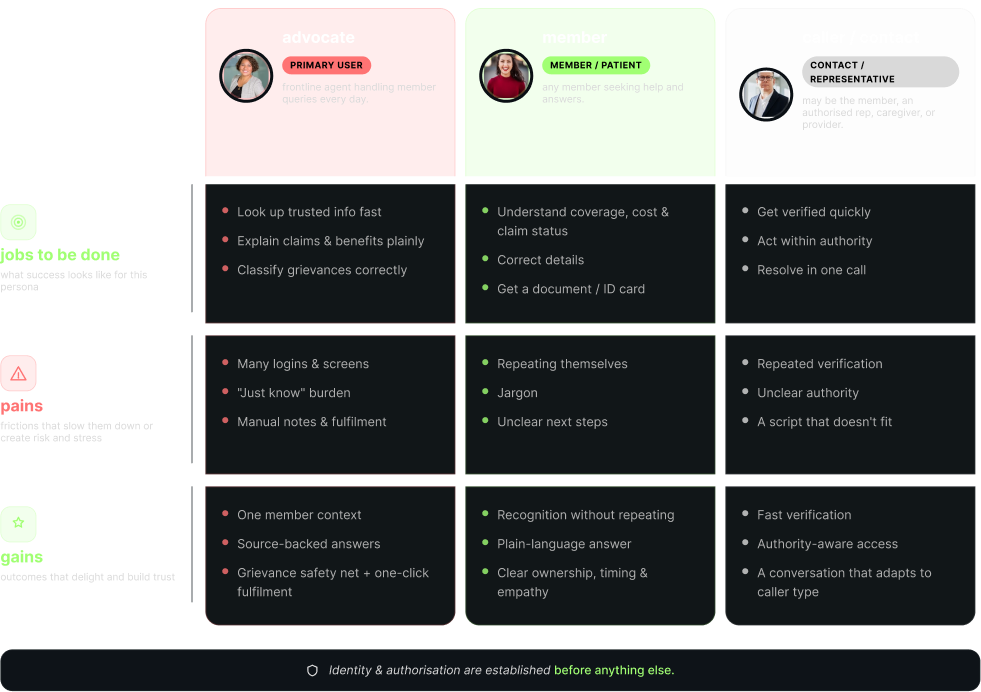
jobs, pains, and gains
for each persona we mapped the jobs to be done, the pains that slow them down or create risk, and the gains worth designing for. one rule cut across all three: identity and authorisation are established before anything else.
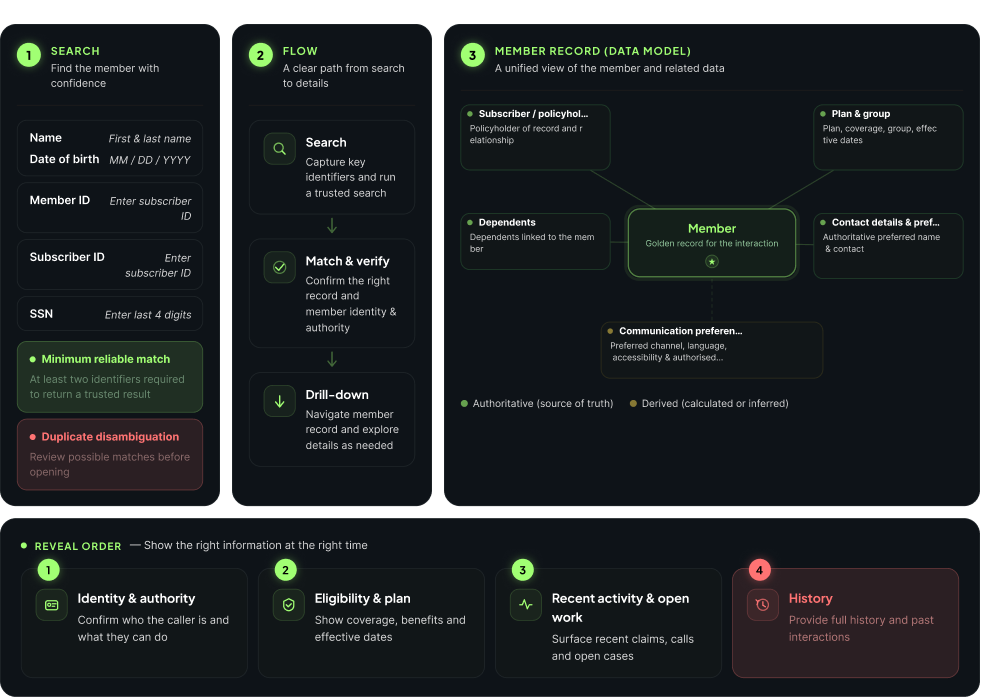
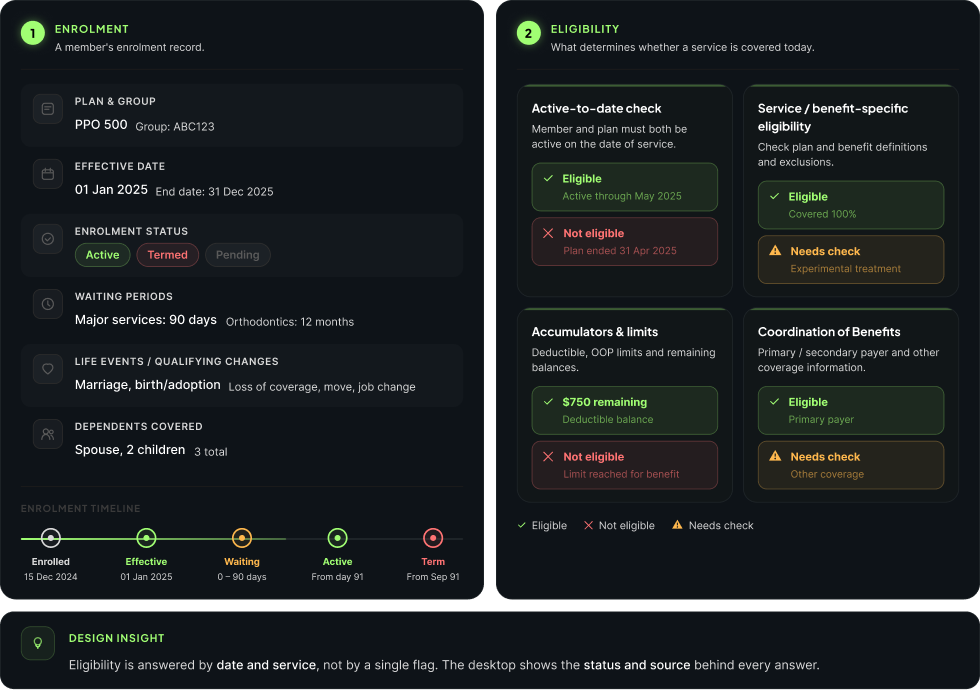
making sense of member data
every call opens with the same problem: find the right person fast, then read their record correctly. i analysed how advocates search, what the member record holds, and how enrolment and eligibility drive what an advocate can answer, then defined the order the desktop should reveal it.
1 / 2
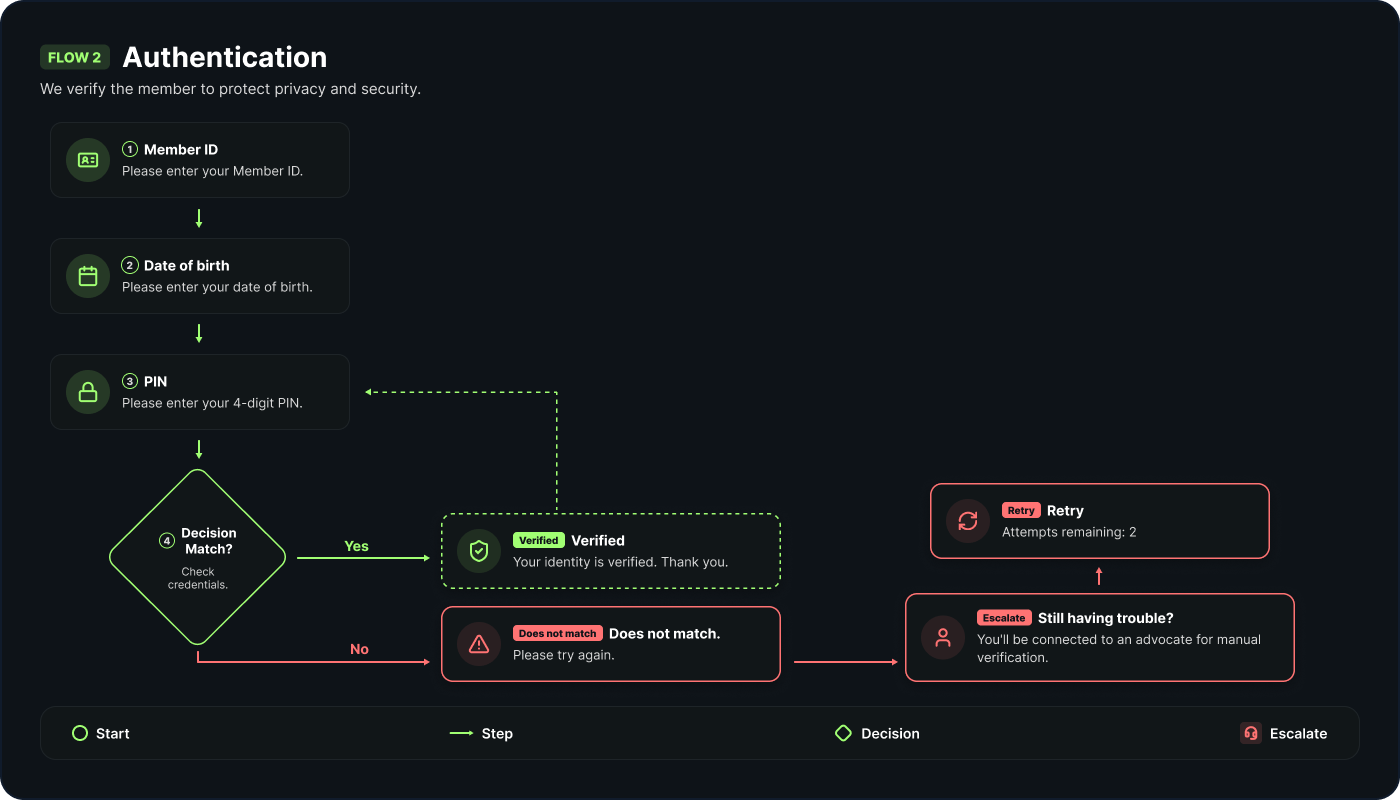
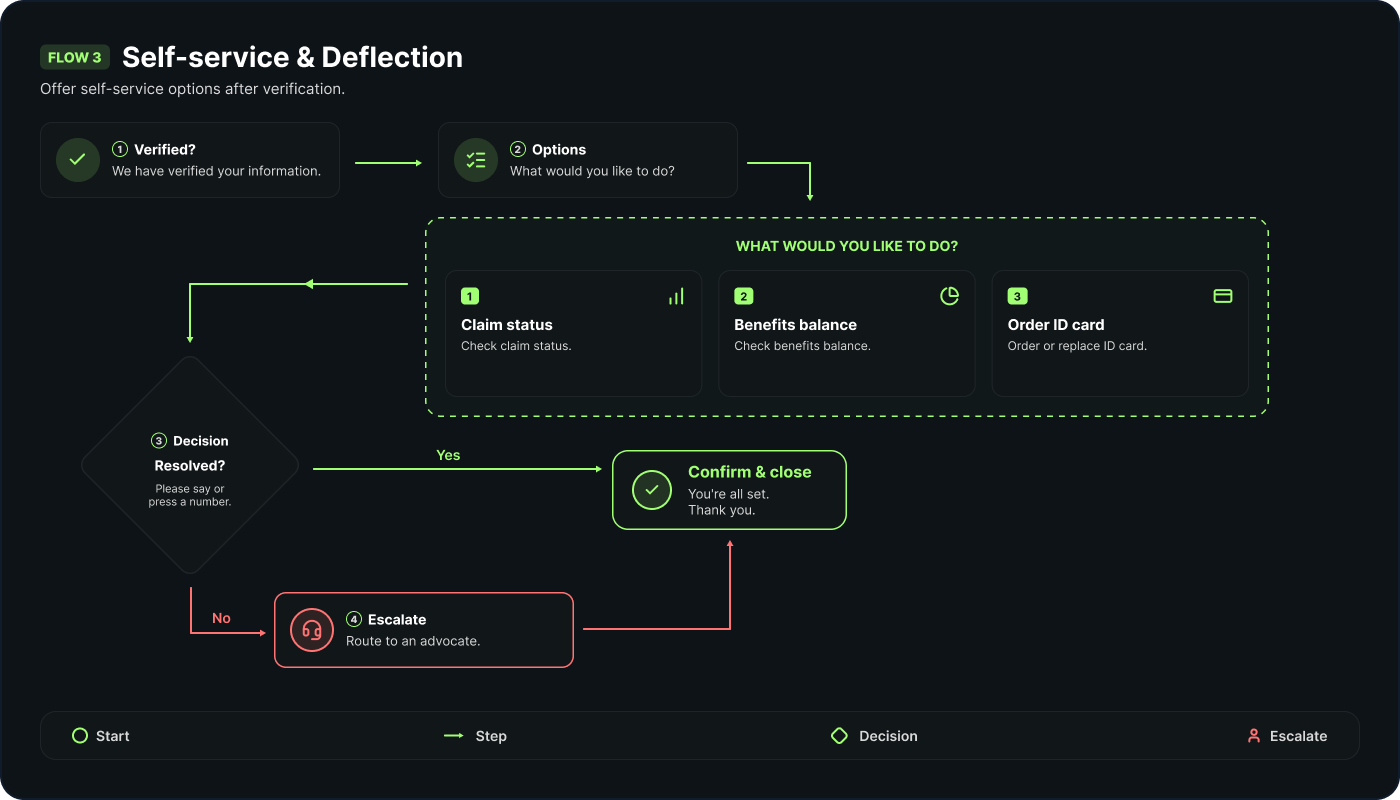
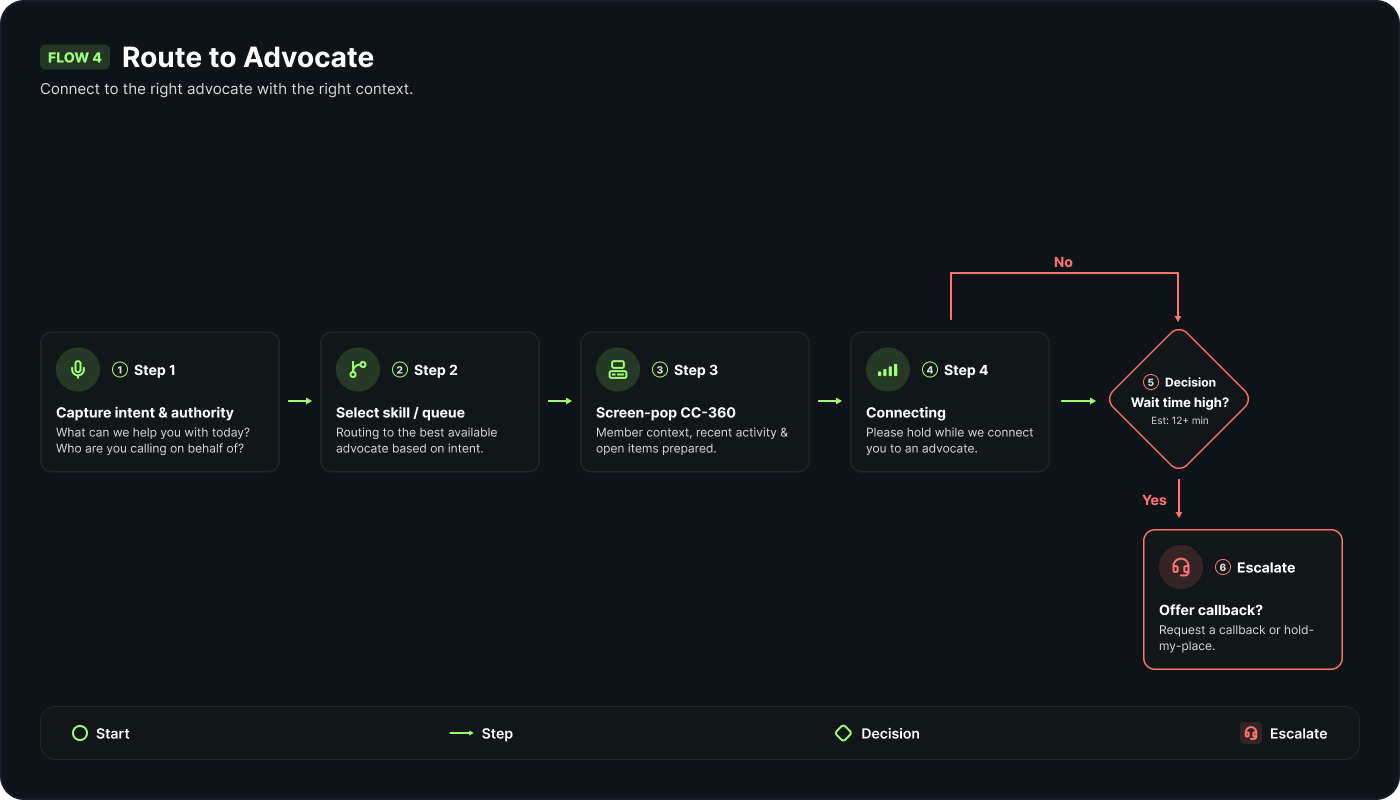
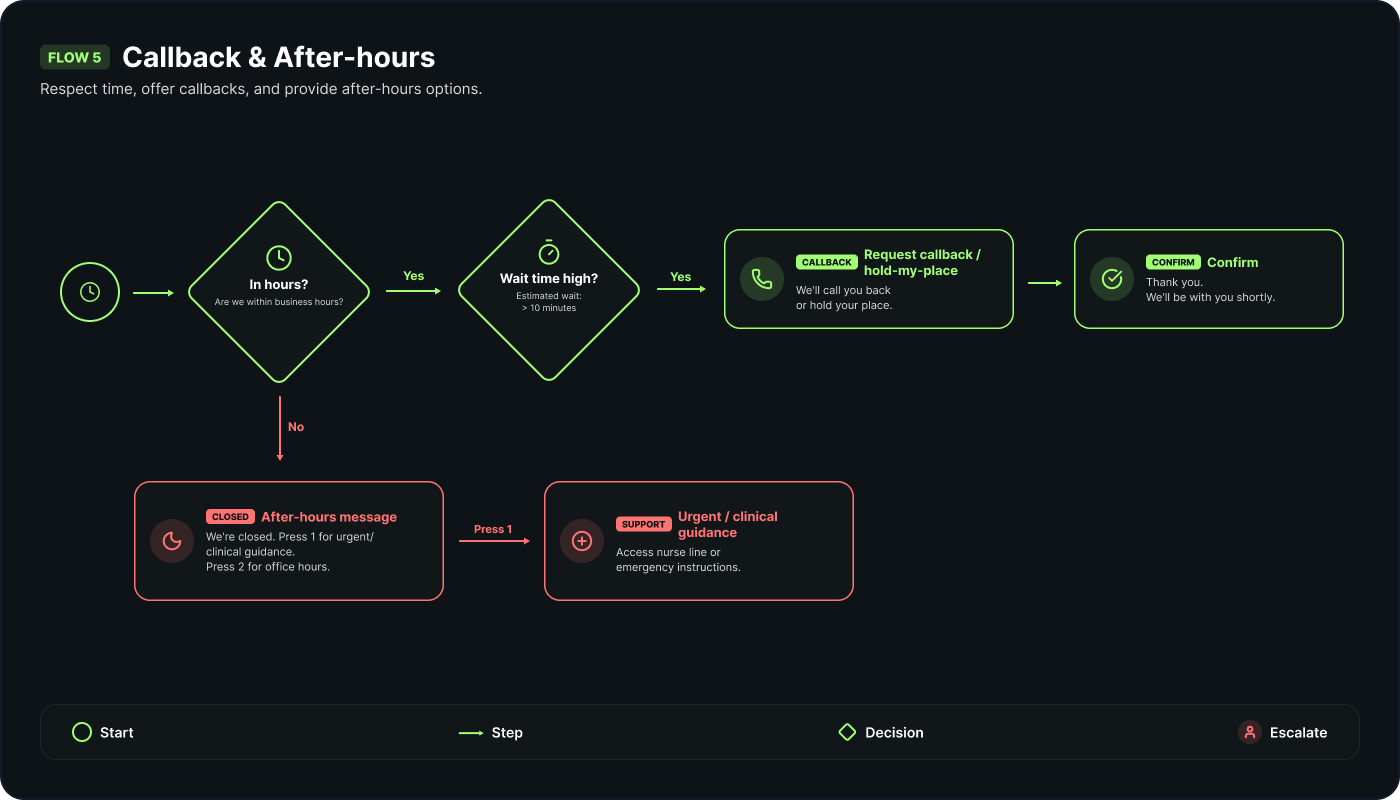
how a call finds its way
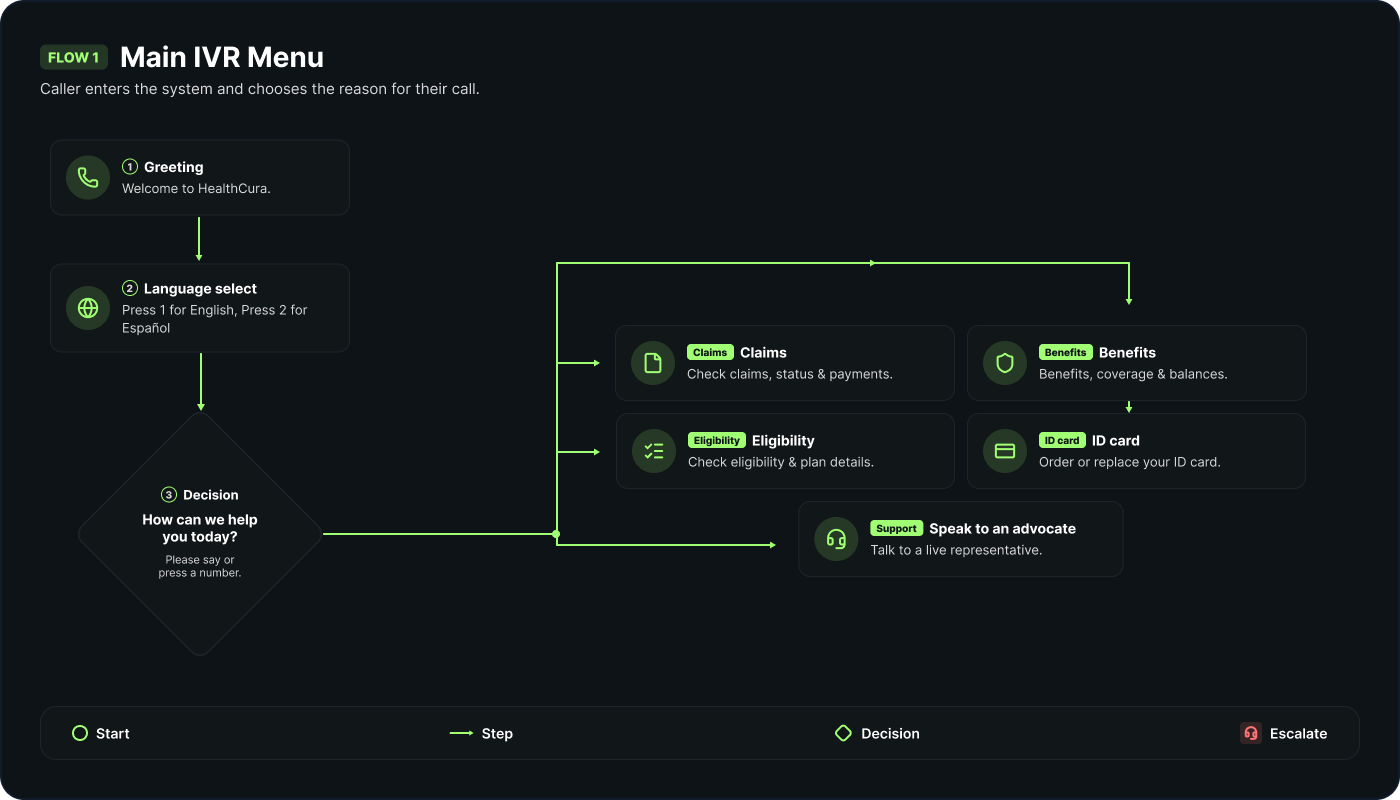
long before it reaches an advocate, the ivr shapes a call: what the member hears, how they are identified, what they can settle on their own, and how everyone else is routed. i mapped the call flows end to end so the desktop understands the context a call already carries the moment it lands.
ideation& designthinking
ideation & design thinking
the call, in the member's shoes
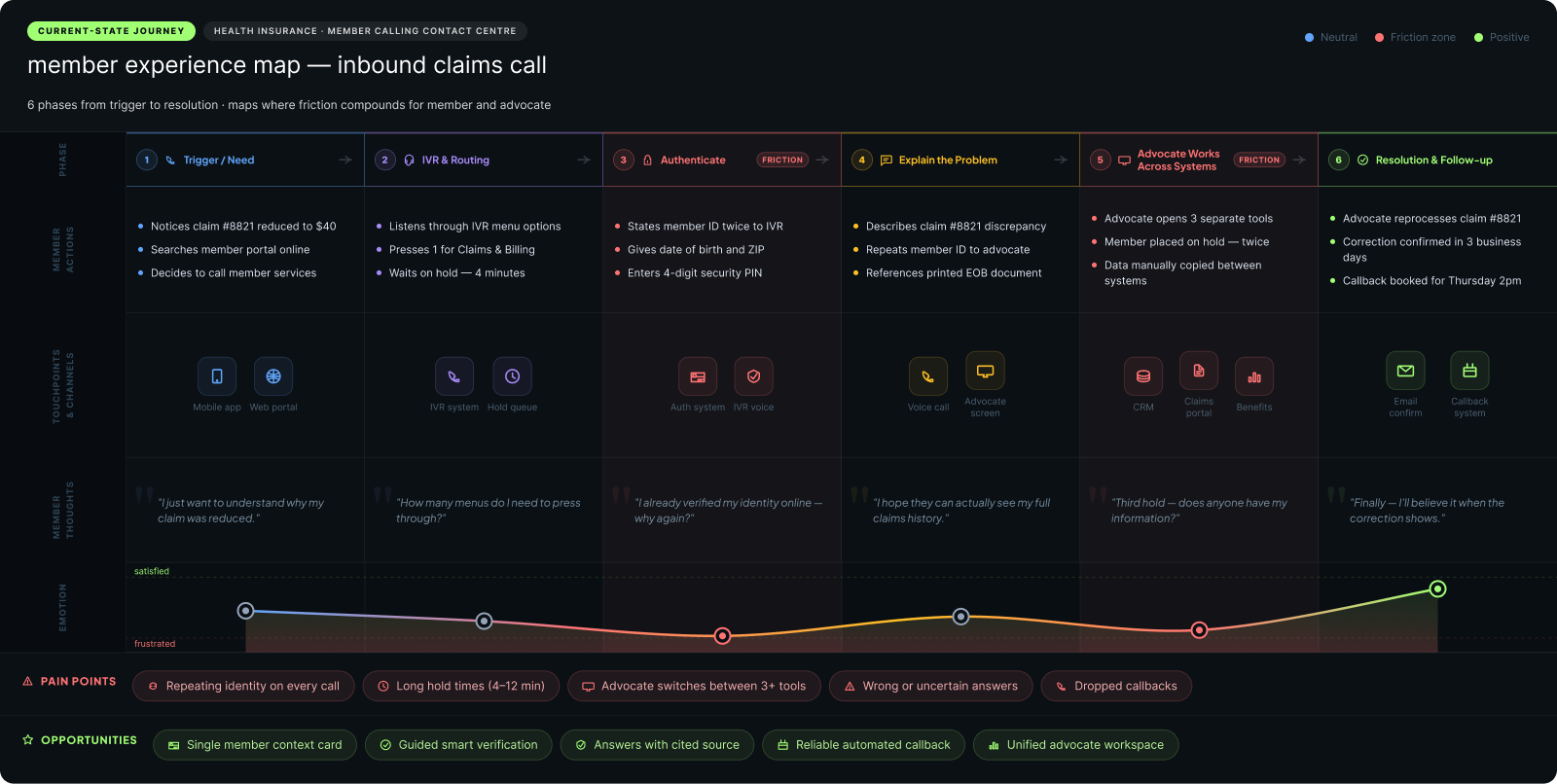
to design the desktop i first mapped the call as the member and advocate actually live it: the trigger, the ivr, the wait, identity checks, the back-and-forth across systems, and the resolution, or the callback that never comes. i charted phases, actions, thoughts, and emotion, and marked the moments that make or break trust, so every later design decision could point back to a real point of pain.
the choreography behind the call
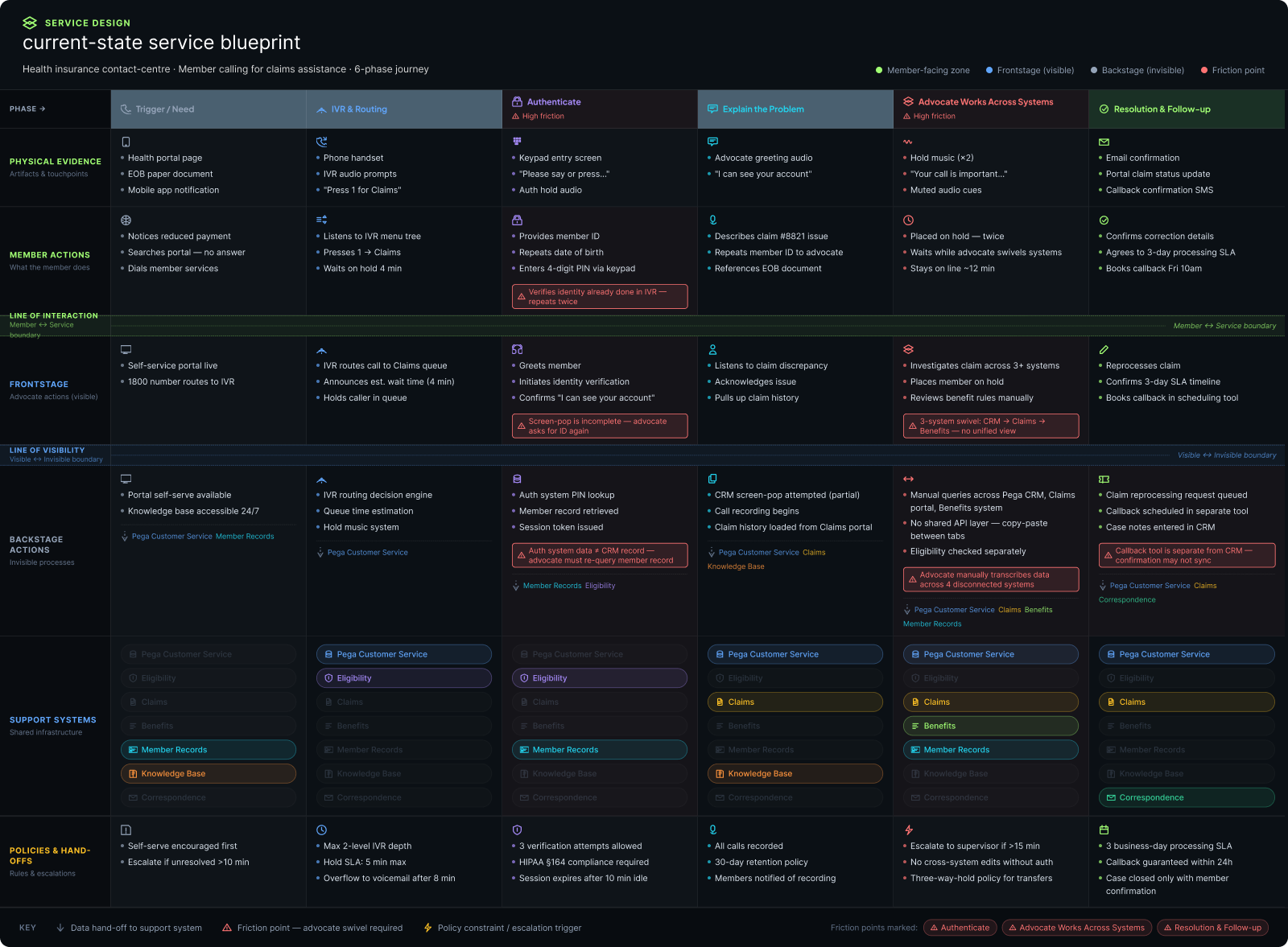
a journey shows what the member feels; a blueprint shows what it takes to deliver. i mapped the layers behind a single call: frontstage advocate actions, backstage steps, the systems each one touches, and the policies and hand-offs in between. the lines of interaction and visibility made the hidden effort obvious, and pointed straight at what the desktop had to unify.
user stories & use cases
the research turned into five advocate use cases, each framed as a user story and a short flow. together they set the scope for the desktop: what an advocate has to accomplish on a call, and the safeguards the interface has to enforce.
challenge& achievements
challenge & achievements
the operating model made speed and accuracy compete, inside a live telephony platform and under strict compliance. the desktop had to make them reinforce each other instead, without inventing a new system for advocates to learn.
challenge
a wall of disconnected systems
advocates moved between eligibility, claims, benefits, records, knowledge and correspondence one tool at a time, re-searching and re-verifying every call.
response
one member context
the open case carries the member across every task, so the advocate reads one record instead of assembling it from six.
challenge
speed versus accuracy
the model rewarded handle time, but a wrong benefit or waiting-period answer is a member-harm and compliance risk, not a rounding error.
response
guidance at the moment of need
guided flows surface the right data and ranked knowledge in place, so getting it right stops costing time.
challenge
rules held in people's heads
advocates were expected to just know dense, changing policy, and to remember verification and filing rules under pressure.
response
safeguards built into the interface
the verification gate masks data until identity is confirmed and the compliance gate blocks a filing until its checklist and window are satisfied. the interface enforces the rules, not memory.
challenge
a modern experience inside pega constellation
the desktop had to feel calm and modern while living within the client's design system and platform constraints.
response
patterns the client can own
built within existing components and case types, shaping reusable patterns that scale beyond these five flows.
the result: a single advocate desktop that unifies the member context, embeds the compliance safeguards, puts guidance at the point of decision, and extends the client's design system rather than replacing it.
key interactions, up close
overview& takeaway
overview & take away
the through-line
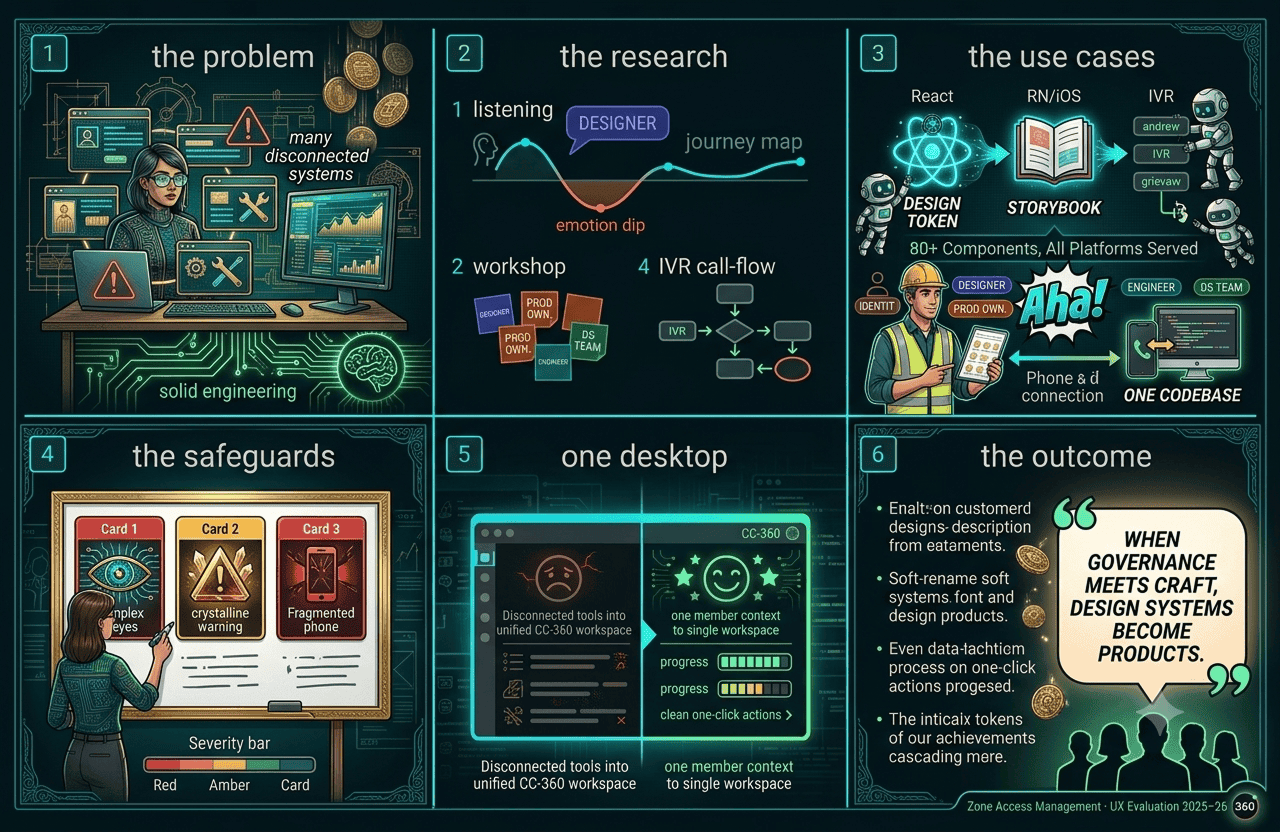
cc-360 turned a fragmented, high-risk advocate workflow into one guided, compliant desktop. research set the scope, ideation shaped the flows, and the interface carried the safeguards, so speed and accuracy stopped competing.
what this project taught me
in a compliance-heavy domain the strongest design moves are the ones that take the rules out of people's heads and put them into the interface. the verification gate and the compliance gate are not features, they are the product doing the remembering so the advocate can stay with the member.
- context over lookup — the case carries the member, so the desktop never re-asks what the ivr already knew
- guard rails over reminders — verification and compliance live in the interface, not in an advocate's memory
- one call, one place — resolution flows and their sub-tasks stay inside the live case, with the call controls always reachable
- specified for three readers — every key interaction documented for design, engineering, and accessibility at once
the desktop's job was not to show more. it was to protect the member and the advocate at the two moments that matter most, and to make the safe path the easy one.
the measure that mattered was never a screen count. it was whether an advocate could stay present with a worried member while the desktop quietly handled identity, policy, and compliance in the background. get that right and the technology disappears, which in a contact centre is the highest praise the work can earn.